
TL;DR:
- Optimizing images boosts website SEO, enhances page load performance, and increases visibility across search surfaces.
- It involves selecting appropriate formats like AVIF, writing descriptive alt text and filenames, and implementing structured data to improve ranking signals.
Image search optimization is the process of enhancing your images and their technical setup to improve your website’s SEO, page performance, and visibility across search engines. Images account for 50 to 70% of a webpage’s total byte weight, making them the single largest performance variable you control. For digital marketers and business owners, understanding why optimize image search is not a technical curiosity. It is a direct lever for organic traffic, conversion rates, and ranking power across Google Search, Google Lens, and AI-powered visual surfaces.
Image optimization shapes your SEO performance through two distinct mechanisms: technical performance signals and content relevance signals. Both feed into Google’s ranking algorithm, and both are within your direct control.
On the technical side, images are the primary driver of Largest Contentful Paint (LCP), one of Google’s Core Web Vitals. Google treats images as ranking infrastructure, meaning unoptimized images do not just slow your page. They actively degrade your relative visibility in search results. A poorly compressed hero image can push your LCP past the 2.5-second threshold Google uses to assess page experience, which directly suppresses rankings.

On the content side, approximately 22.6% of SERPs include image results, which means nearly one in four search results pages presents an image carousel or visual panel. If your images are not optimized for discovery, you are invisible on those surfaces. Alt text, filenames, and surrounding content each function as ranking signals that Google reads to understand what an image depicts and whether it matches a user’s query.
The importance of image optimization extends to emerging surfaces like Google Lens and AI Overviews. These tools surface images based on contextual text signals, not just the image file itself. Optimizing your images for these surfaces requires the same foundational practices that improve standard search rankings, but with additional attention to structured data and descriptive metadata.
Pro Tip: Set your LCP image to "loading="eager"andfetchpriority=“high”` in your HTML. This tells the browser to prioritize that image above all others, which is the fastest single change you can make to improve Core Web Vitals scores.
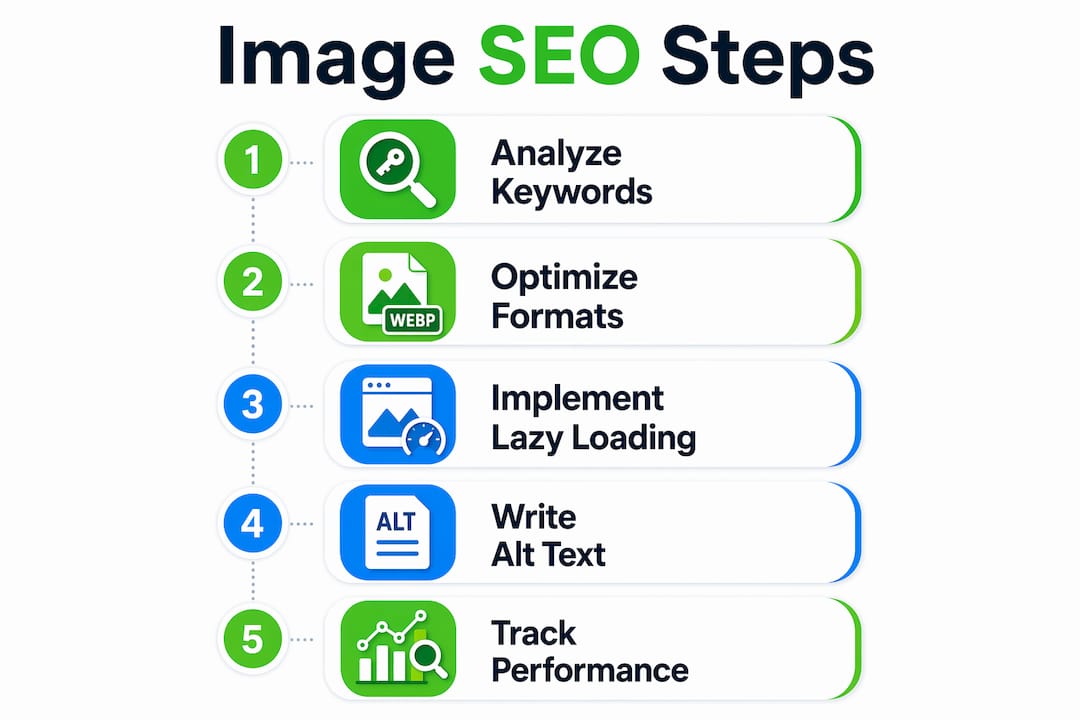
Choosing the right image format is the foundation of any technical image SEO strategy. The format determines file size, rendering speed, and browser compatibility, all of which affect your Core Web Vitals scores and user experience.
| Format | Best Use Case | Key Advantage | Browser Support |
|---|---|---|---|
| JPEG | Photographs, complex visuals | Widely supported, good compression | Universal |
| WebP | General web images, product photos | 25 to 35% smaller than JPEG | All modern browsers |
| AVIF | High-quality photos, hero images | 50% smaller than JPEG, best quality-to-size ratio | Chrome, Firefox, Safari 16+ |
| PNG | Logos, icons, transparency needed | Lossless quality | Universal |
| SVG | Icons, logos, simple graphics | Infinitely scalable, tiny file size | Universal |
AVIF is the highest-leverage format available in 2026. Converting a JPEG hero image to AVIF reduces file size by up to 50% while maintaining visual quality, which translates directly to a 1 to 3 second LCP improvement. That improvement alone can move a page from a failing Core Web Vitals score to a passing one.
Responsive images are equally critical. The srcset and sizes attributes in HTML tell the browser which image file to load based on the user’s screen size and resolution. Without these attributes, mobile users load the same oversized image as desktop users, which wastes bandwidth and inflates load times. Tools like Cloudinary and Imgix handle responsive image delivery automatically through their CDN infrastructure, generating the correct format and size for each device on the fly.
Lazy loading is a powerful technique, but it carries one significant pitfall. Applying loading="lazy" to your LCP or hero image delays its rendering because the browser waits to load it until it enters the viewport. For above-the-fold images, always use loading="eager" and fetchpriority="high". Reserve lazy loading for images that appear below the fold, where deferred loading genuinely saves bandwidth without harming performance scores.
Pro Tip: If you use WordPress, plugins like ShortPixel or Imagify automatically convert uploads to WebP or AVIF and generate srcset attributes. This removes the manual work from format conversion and responsive image delivery.
The textual signals surrounding an image are what search engines and AI visual search tools use to understand and rank it. For AI-powered visual search engines, alt text and captions are the primary way images are discovered and ranked. An image without quality descriptive text is effectively invisible to AI vision models, regardless of how well-compressed the file is.
Effective alt text follows three rules. It describes the image content specifically, it incorporates a relevant keyword naturally, and it stays under 125 characters to avoid truncation by screen readers. “Cannabis dispensary interior with glass display cases and product labels” is strong alt text. “Image” or “photo1.jpg” provides zero ranking value and actively signals low-quality content to Google.
Filenames work the same way. Google reads the filename as a content signal before it even processes the image. Rename files from “IMG_4823.jpg” to “denver-dispensary-storefront.jpg” before uploading. Use hyphens to separate words in filenames, keep them descriptive, and include a target keyword where it fits naturally.
Here are the core best practices for image metadata optimization:
Google’s multi-signal image ranking treats alt text, filename, surrounding content, and schema as a combined system. Missing any one of these signals caps your visibility multiplicatively, not just marginally. A page with perfect alt text but no schema and a generic filename will consistently underperform a page where all four signals are present and aligned.
The business case for image SEO is concrete. Image search drives 20 to 40% of organic traffic for visual-heavy industries, which includes retail, cannabis, food and beverage, and any business that sells physical products. If you are not appearing in image carousels and Google Lens results, you are ceding a significant share of qualified traffic to competitors who have done the work.
The conversion impact is equally direct. Pages that load in 1 second convert at 3 times the rate of pages that load in 5 seconds. Since images are the largest contributor to page load time, optimizing them is the fastest path to improving your conversion rate without changing a single word of copy or redesigning your site.
The timeline for results follows a predictable pattern. Core Web Vitals improvements typically appear within 1 to 2 weeks of implementing compression and format changes. Organic traffic gains of 10 to 25% generally materialize within 60 to 90 days as Google re-crawls and re-ranks your pages based on improved performance signals. This is one of the faster-returning SEO investments available to a business owner.
Follow these steps to implement image optimization across your site:
srcset and sizes attributes, or use a CDN like Cloudinary or Imgix to handle delivery automatically.loading="lazy". Set hero images to fetchpriority="high".For cannabis businesses specifically, product photography is a primary driver of purchase intent. Customers searching for specific strains, edibles, or accessories on Google Images or Google Lens are high-intent buyers. A well-optimized cannabis website design that pairs strong product images with proper alt text and schema can capture this traffic in ways that paid advertising cannot, given the platform restrictions cannabis brands face.
Pro Tip: Check Google Search Console’s “Search type” filter and switch to “Image” to see exactly how much traffic your images currently generate. Most business owners are surprised to find this number is near zero, which confirms the opportunity.
Image search optimization multiplies your SEO performance by combining technical format improvements, descriptive metadata, and structured data into a single compounding ranking system.
| Point | Details |
|---|---|
| Images dominate page weight | Images make up 50 to 70% of page byte weight; converting to AVIF cuts size by 50%. |
| Alt text drives AI visibility | Alt text and captions are the primary signals AI visual search tools use to rank images. |
| Ranking signals are multiplicative | Alt text, filename, schema, and context together produce exponentially greater visibility than any single signal. |
| Speed directly lifts conversions | Pages loading in 1 second convert at 3x the rate of 5-second pages; image optimization is the fastest fix. |
| Traffic gains follow a timeline | Core Web Vitals improve in 1 to 2 weeks; organic traffic gains of 10 to 25% arrive within 60 to 90 days. |
I have reviewed hundreds of websites for cannabis dispensaries, retailers, and service businesses. The pattern is almost universal: the site has decent copy, reasonable backlinks, and a Google Business Profile that is mostly filled out. But the images are a disaster. Uncompressed JPEGs from a smartphone upload, filenames like “photo (3).jpg,” blank alt text fields, and no schema in sight.
What surprises me is not that businesses skip image optimization. It is that they skip it after investing thousands of dollars in content and link building. Those investments are real, but they are working against a headwind created by slow-loading, undescribed images that suppress Core Web Vitals scores and leave entire search surfaces unaddressed.
The shift I have seen in 2026 is that Google Lens and AI Overviews are no longer edge cases. They are mainstream discovery channels, especially for product-based businesses. A dispensary with optimized product photography and ImageObject schema can appear in AI Overview panels for queries like “best indica edibles near me” in ways that standard text SEO cannot achieve alone. That is a real competitive advantage, and most businesses are not pursuing it.
The site speed checklist for dispensaries I recommend to clients always starts with images, not JavaScript or server configuration. Images are the highest-leverage fix, the fastest to implement, and the most consistently overlooked. If you take one thing from this article, let it be this: your images are not decoration. They are ranking infrastructure.
— Max
Dopeseo specializes in SEO for cannabis businesses, where platform restrictions make organic search the primary growth channel. Image optimization is built into every technical SEO engagement, from format conversion and alt text audits to ImageObject schema implementation and Core Web Vitals remediation.
If your product pages are loading slowly, your images are missing alt text, or you have never appeared in a Google Image carousel, those are fixable problems with measurable returns. Dopeseo’s cannabis SEO strategies are built around the specific constraints and opportunities cannabis brands face, including how to generate organic traffic when paid channels are restricted. Reach out to Dopeseo to get a technical image audit and a clear plan for turning your visual assets into a search traffic engine.
Image search optimization is the practice of improving image files, metadata, and technical delivery to increase visibility in Google Image Search, Google Lens, and AI-powered visual search results. It includes format selection, alt text, filenames, structured data, and Core Web Vitals improvements.
Core Web Vitals improvements from image optimization typically appear within 1 to 2 weeks, and organic traffic gains of 10 to 25% generally follow within 60 to 90 days. For visual industries, image search can drive 20 to 40% of total organic traffic.
AVIF is the best format for photographs and hero images in 2026, reducing file size by up to 50% compared to JPEG while maintaining quality. Use WebP as a fallback for browsers without AVIF support, and PNG or SVG for logos and icons.
Alt text is one of four core ranking signals Google uses for image search, alongside filename, surrounding content, and structured data. Missing alt text caps your image’s visibility across all search surfaces, including AI Overviews and Google Lens.
Run your URL through Google PageSpeed Insights or Lighthouse to identify oversized images, outdated formats, and lazy loading errors on above-the-fold content. In Google Search Console, filter the Performance report by “Image” search type to see your current image traffic baseline.

© 2026 Curious Monkeys Pressing Buttons LLC DBA Cannabiz Marketing Solutions AKA DopeSEO. All rights reserved.